


Quick answer: Yes — a factory reset wipes your phone back to the state it was in the day you bought it, and because it erases all installed apps and data, it removes almost all stalkerware and spyware along with it, even hidden apps. But two things can undo it: restoring apps from an old backup afterward can reinstall the spyware, and if the person who installed it might harm you, a reset can alert them that they’ve lost access. So the reset itself is the easy part. Doing it safely — backing up only your photos and files, not your apps; changing your passwords from a different device; and planning around your safety first — is what actually keeps the spyware gone.
If you’ve confirmed monitoring software on your phone and you want it truly gone, a factory reset is the most thorough option available to a regular person. It doesn’t rely on finding and deleting one specific app; it clears everything and starts fresh. This guide explains when a reset is the right call, how to prepare so you don’t reinfect yourself or lose your data, and the exact steps for both iPhone and Android — with the safety considerations that matter most when the spyware was installed by someone you know.
Last updated: August 2026 · Written by Samuel Smith, a consumer technology writer and digital privacy researcher focused on removing spyware and securing phones for everyday users.
Does a factory reset actually remove spyware?
For the overwhelming majority of consumer spyware and stalkerware, yes. These apps live in the phone’s normal storage alongside your other apps and data, and a factory reset erases all of it. When the phone reboots, the monitoring app is gone. This is why a reset is the recommended last-resort cleanup when you can’t be sure you’ve found every trace of a monitoring tool manually.
There are rare exceptions. Sophisticated malware that has embedded itself deeper in the system is unusual on everyday phones and typically targets high-profile individuals, not ordinary users. And on Android, if an account with spyware set to auto-install is re-added after the reset, the app can come back — which is exactly why the backup and account steps below matter. For nearly everyone, though, a clean reset plus a careful restore removes the problem.
Before you reset: think about safety first
This is the most important section, so read it before you touch any settings. Completely removing stalkerware can alert whoever installed it, because their access suddenly stops working. If that person is an abusive partner, ex, or anyone who might react badly to losing control, a sudden reset can escalate the situation and put you at physical risk.
If there’s any chance that applies to you, do not reset on impulse. Instead:
- Make a safety plan first. Our guide on building a technology safety plan walks through how to protect yourself before you change anything the monitor can see.
- Consider using a separate, safe device — a friend’s phone or a library computer — for any planning or account changes, so the monitored phone doesn’t reveal what you’re doing.
- Reach out for expert help. A domestic-violence advocate can help you time this safely. In the U.S., the National Domestic Violence Hotline (1-800-799-7233) and the National Network to End Domestic Violence’s Safety Net project (nnedv.org/tech-abuse) offer free, confidential guidance on exactly this situation.
- Preserve evidence if you may need it. Before wiping, screenshot the suspicious app, its permissions, and anything that documents the monitoring, and save those screenshots to a safe place off the phone.
If you’re not sure whether a partner installed something, our guide on the signs a partner installed a spy app can help you assess the situation before you act.
Step 1: Back up the right things — and only the right things
From experience: I’ve factory-reset plenty of phones over the years — less often lately — and the trap I’ve watched friends fall into isn’t the reset itself. A reset does wipe everything, but restoring the easy way from a backup can carry the spyware right back in; setting the phone up fresh and reinstalling apps by hand is the only way to be sure it’s gone.

The single biggest mistake people make is resetting the phone and then restoring everything from a recent backup — which quietly reinstalls the spyware you just removed. The rule is simple: save your personal data, not your apps or system backup.
- Do back up: photos and videos (to a cloud photo service or your computer), important documents, and contacts. These are just files and can’t carry spyware into a fresh install.
- Do not plan to restore from a full device backup or “restore all apps and data,” because a backup made while the spyware was present can bring it right back. You’ll reinstall your apps individually from the App Store or Play Store instead.
Also write down or securely store the logins you’ll need to sign back into your key accounts — ideally in a password manager so you’re not tempted to reuse weak passwords when you set the phone up again.
Step 2: Factory reset an iPhone
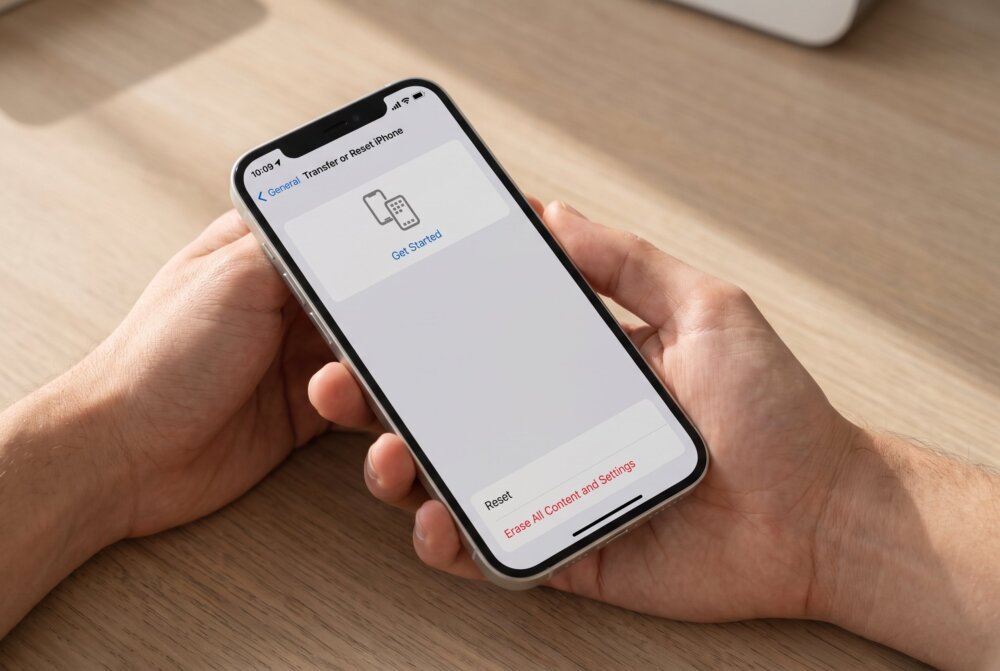
You can reset directly on the device: open Settings → General → Transfer or Reset iPhone → Erase All Content and Settings, then follow the prompts. You’ll need your Apple ID password to turn off Activation Lock. For the most thorough result — and to be sure you’re installing clean software — you can instead connect the iPhone to a computer and use the Restore iPhone option in Finder (Mac) or the Apple Devices app (Windows), which reinstalls the operating system from scratch.
When the phone restarts and asks how to set it up, choose Set Up as New iPhone — do not restore from an iCloud or computer backup of the infected phone. Then reinstall your apps one at a time from the App Store.
Step 3: Factory reset an Android phone
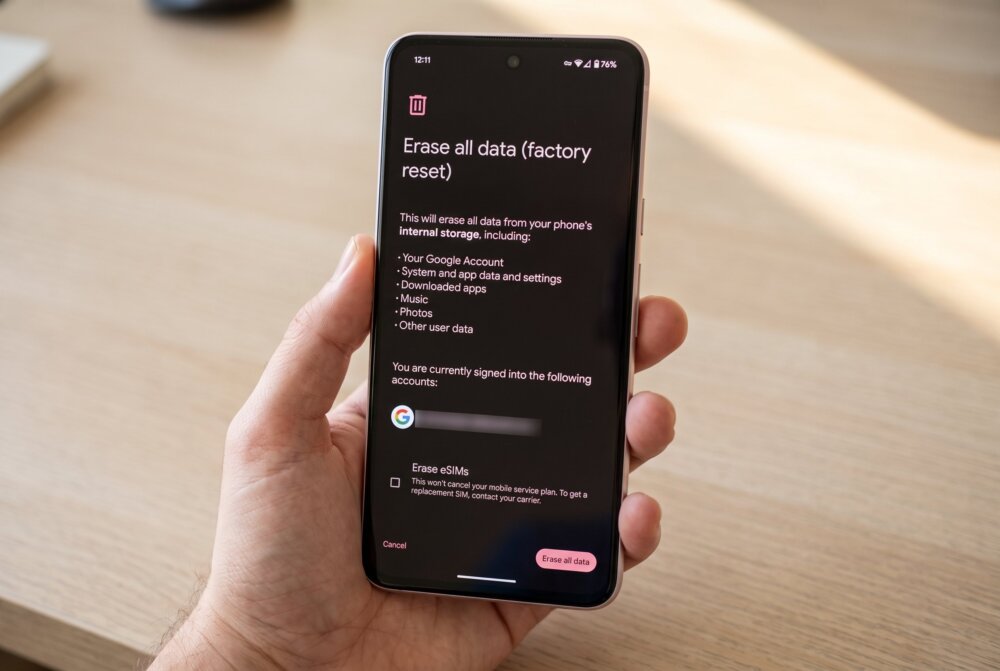
The exact menu names vary by brand, but the path is similar: open Settings → System (or General management) → Reset → Factory data reset, then confirm. If you can’t get into Settings — some aggressive monitoring apps make that hard — you can boot into recovery mode by holding the power and volume buttons and choosing “wipe data/factory reset” from there.
When you set the phone up again, be selective about which Google account you add back and don’t bulk-restore apps. If a specific Google account was used to push the spyware, securing that account is essential — see our guide on how to secure your Google account before you sign it back in.
Step 4: Lock everything down after the reset
A clean phone with compromised accounts is still exposed, so finish the job:
- Change the passwords to your email, cloud, and social accounts — ideally from a different trusted device, in case anything lingered. Make each one strong and unique.
- Turn on two-factor authentication everywhere it’s offered, and review each account’s recovery email and phone number so the monitor can’t reset their way back in.
- Set a strong passcode on the phone itself and never share it. Most stalkerware needs physical access to install, so a private passcode is your best ongoing defense.
- Reinstall apps deliberately, one at a time, only from the official app store — not from a backup and not from links someone sent you.
When a reset might not be enough — or not necessary
If you’d rather not wipe the whole phone, you can often remove a single known monitoring app manually first; our guide on finding and removing spy apps covers that gentler approach. A reset is the right escalation when you can’t be certain you’ve found everything, when the phone behaves strangely even after you’ve deleted suspicious apps, or when you simply want the peace of mind of a clean slate. And in the rare case where a phone still shows signs of monitoring after a proper reset and clean setup, that’s the point to seek professional help or replace the device, since it may point to something deeper than ordinary stalkerware.
Traveling soon? Lock down every device before you go.
Your phone, laptop, and tablet all carry your accounts, photos, and passwords — and every one of them is more exposed on hotel Wi-Fi, in airports, and away from home. Our free Travel Security Kit Builder walks you through a personalized checklist to protect whatever you’re taking with you.
Frequently asked questions
Will a factory reset remove all spyware?
For everyday consumer spyware and stalkerware, yes — a reset erases all apps and data, so the monitoring app goes with it. The exceptions are rare, sophisticated malware embedded deep in the system (uncommon on ordinary phones) and cases where you restore an infected backup or re-add an account that reinstalls the app. Set the phone up as new and reinstall apps individually to avoid those traps.
Can spyware survive a factory reset?
Almost never on its own. The usual way spyware “survives” is that people restore it themselves by loading an old full backup or re-adding the account that pushed it. Very rarely, deeply embedded malware can persist, but that’s the exception, not the rule. Backing up only your photos and files — not apps — is what keeps a reset permanent.
Should I back up my phone before resetting it?
Back up your personal data — photos, videos, documents, contacts — to the cloud or a computer. Do not make or restore a full app-and-data backup of the infected phone, because that can carry the spyware into your fresh install. Reinstall apps one at a time from the official store instead.
Will the person spying on me know if I factory reset?
Possibly. When you wipe the phone, their monitoring stops working, and many stalkerware tools notify the person or simply make the loss of access obvious. If that person might harm you, plan for your safety before you reset — make a safety plan, use a separate safe device to prepare, and consider talking to a domestic-violence advocate about timing.
Is it better to factory reset or just delete the spyware app?
Deleting a single known app is faster and less disruptive, and it’s a fine first step if you’re confident you’ve found the only monitoring tool. A factory reset is more thorough when you can’t be sure, when odd behavior continues after deleting apps, or when you want a guaranteed clean slate. Either way, change your account passwords afterward from another device.
What do I do right after the reset to stay safe?
Set the phone up as new, reinstall apps individually from the official store, then change your key account passwords from a different trusted device and turn on two-factor authentication everywhere. Review each account’s recovery email and phone number, and set a strong, private passcode on the phone so no one can install anything again without your knowledge.
A factory reset is the closest thing to a fresh start your phone has — but it only stays clean if you restore your files instead of your apps and re-secure your accounts afterward. And if the spyware came from someone who might hurt you, your safety plan comes before the reset, not after.
This is a sensitive topic. If you’re dealing with an abusive partner or someone who may harm you, help is available. In the U.S., the National Domestic Violence Hotline (1-800-799-7233) and the National Network to End Domestic Violence’s Safety Net project (nnedv.org/tech-abuse) offer free, confidential guidance on technology safety and timing changes like this one.
Written by Samuel Smith, a consumer technology writer and digital-privacy researcher focused on removing spyware and securing phones for everyday users.